
EN
Order now

Paying for Dino IPTV, step by step

Three ways to pay for a Dino IPTV subscription or reseller credits. Pick one, follow the steps and send us the screenshot on WhatsApp.

Paying for Dino IPTV, step by step

Binance Pay

Instant and free between two Binance accounts. Use the crypto you already hold.

  1. Open Binance and tap Pay, then Send.
  2. Choose Binance ID and paste our ID below.
  3. Send the exact amount and take a screenshot of the confirmation.

Our ID

353670968
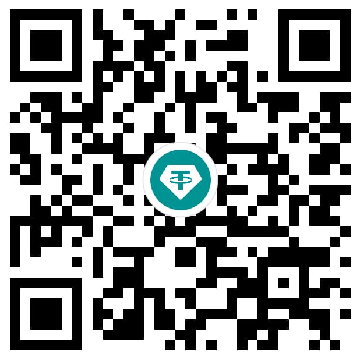
USDT (TRC20)

Send USDT from any wallet or exchange on the TRON (TRC20) network.

  1. In your wallet, choose USDT and the TRON (TRC20) network.
  2. Scan the QR code or paste our address below.
  3. Send the exact amount and take a screenshot of the transfer.
QR code of our USDT TRC20 address

Our address

TUi36Ub2KZXDU23BXc8bKtemr4qe5Dw5Z7
Use TRC20 only. USDT sent on another network cannot be recovered.

Morse

A simple money app: send euros to our Morse username in a few taps.

  1. Create your free and secure account.
  2. Open the Morse app and tap Transfer.
  3. Tap Send.
  4. Choose Pay someone on Morse.

Our username

@Omartv

After you pay

Send the payment screenshot in the WhatsApp chat opened by your order. We check it and send your Dino IPTV login or credits, normally within 15 minutes.

Why it is safe

  • We never ask for a bank card or a password.
  • The exact amount shows before you pay.
  • A real person follows every order on WhatsApp.
  • Refund within 7 days, to the payment method you used.

Your questions about Dino IPTV

Which payment method is the fastest?

Binance Pay is instant between Binance accounts. USDT and Morse usually take a few minutes.

Can I pay by bank card?

No. To protect your data we only accept Binance Pay, USDT (TRC20) and Morse.

I sent the wrong amount. What happens?

Send us the screenshot on WhatsApp: we ask for the rest or refund the difference.

Ready to watch Dino IPTV?

Pick your plan, pay safely and receive your Dino IPTV login on WhatsApp a few minutes later.